Group Redundancy Blocker
Duplicate groups are stopped before they are created, so self-service never multiplies the mess it was meant to fix.
Join the group. Open the app.
The most common help-desk ticket is "I need access to an app." With Avatier, it becomes a group request that the owner approves from a push notification. The app then appears in the requester's My Apps, ready to launch with single sign-on.
















































Protecting the world’s workforce since 1997 • Over 15 Million Licenses Sold
Why It Matters
When routine identity work funnels through the help desk, it creates ticket backlogs, slow onboarding, frustrated users, and the shadow-IT workarounds that quietly erode security.
What's in Your Queue
An analysis of more than 50,000 help-desk tickets across 30+ organizations found that app assignment alone is the single largest ticket type. Add permission changes and offboarding and it reaches 40% of the queue. That is exactly the work group self-service moves off the desk.
| # | Top 10 help-desk requests | Share of all tickets |
|---|---|---|
| 1 | App assignment | 28.1% |
| 2 | Permissions management | 6.2% |
| 3 | Employee offboarding | 5.8% |
| 4 | Employee onboarding | 5.7% |
| 5 | Login troubleshooting | 4.9% |
| 6 | Channel management | 3.6% |
| 7 | Application troubleshooting | 3.5% |
| 8 | Device provisioning | 2.9% |
| 9 | Email management | 2.6% |
| 10 | Contractor offboarding | 2.4% |
Source: Fixify 2026 IT Help Desk Benchmark Report, 50,000+ tickets, Jan 2025–Feb 2026.
The Business Imperative
IT is drowning in routine requests.
When the only path to a group change or account update is an IT ticket, three things follow: backlogs that delay the business, over-broad access granted just to unblock people, and workarounds like shared logins and standing privileges that never get cleaned up. The help desk becomes both a cost center and a security liability.
| Root Cause | Solution |
|---|---|
| Ticket BacklogsRoutine tasks queue behind IT, delaying onboarding and blocking managers. | Governed Self-ServiceUsers and managers handle routine group and account tasks directly, cutting help-desk volume and wait times. |
| Over-Broad “Just Unblock Them” AccessAccess is granted quickly and too widely to clear the queue. | Policy-Driven ApprovalsEvery request runs through approval chains and least-privilege rules before it takes effect. |
| Orphaned Groups & Stale AccessSelf-created groups and old memberships linger with no cleanup. | Lifecycle + Patent-Pending Continuous Governance™Expired groups are retired, unauthorized members flagged, and access reconciled to each user's role automatically. |
Manual, ticket-bound identity work is slow, costly, and insecure. Avatier Group & User Self-Service removes the bottleneck by giving the business governed control — IT sets the guardrails, and audit captures everything.
How App Access Works
IT assigns each application to the groups that should have it. When a person joins one of those groups, the app appears in their My Apps and launches with single sign-on. When they leave the group, the access goes with it.
Adoption decides whether self-service works. Avatier puts it inside the tools people already open every day.










Avatier delivers governed self-service from your authoritative sources through a single unified integration — no point-to-point connectors to build or maintain, and one consistent experience everywhere users work.
Avatier Identity Anywhere 2027™ Preview
Build with the AI You Choose
Premium personalization with zero consultant waste. Spin up an agent that requests access, checks entitlements, or pulls identity analytics—with Claude Code, OpenAI Codex, GitHub Copilot, or any MCP client.
 Claude Code
Voice, chat, or any API—identity shows up in
One platform. Every identity experience secured.
Claude Code, OpenAI Codex, GitHub Copilot, Microsoft Teams and Outlook are trademarks of their respective owners. No partnership with or endorsement by any third party is implied.
The 12 Group Functions
Each one is a menu item in Avatier today. Here is the moment each earns its keep, and who benefits.
| # | Function | The moment it matters | Who wins |
|---|---|---|---|
| 1 | Add Members | A new hire joins Accounts Payable. Her manager adds her to Finance-AP from Teams, and her finance apps are waiting on day one. | Manager · Help Desk |
| 2 | Remove Members | A contractor's engagement ends Friday. The owner removes them that day, and their app access ends with it. | CISO · Security |
| 3 | Modify Group | A project changes scope. The owner updates the group's description and settings without filing a ticket. | Manager |
| 4 | Create Group | A new product team needs its tools. The manager creates the group in a guided wizard, and the Redundancy Blocker stops a duplicate. | Manager · CIO |
| 5 | Rename Group | A reorg renames the department. The group name follows, so the directory stays clean and the audit trail stays intact. | CIO · Help Desk |
| 6 | Delete Group | A project closes. The owner deletes its group, closing a dormant path into the project's apps. | CISO |
| 7 | Change Group Expiration | An M&A integration team is set to expire in 90 days. Owners are notified and can extend it or let it retire on schedule. | CISO · Auditors |
| 8 | Add Owners | A backup owner is assigned, so app requests keep moving while the primary owner is out. | Manager · Help Desk |
| 9 | Remove Owners | An owner leaves the company. Ownership moves to a successor, so no group is left without someone accountable. | Director of Security |
| 10 | Bulk Assign Owners | After a reorg, owners are assigned to hundreds of groups in one action instead of hundreds of tickets. | CIO · Help Desk |
| 11 | Add Nested Groups | The whole West Region sales team gets the CRM by nesting their group inside the CRM access group, within policy. | Manager · CIO |
| 12 | Remove Nested Groups | A nested group turns out to grant far more app access than intended. It is removed, and the inherited access goes with it. | CISO · Security |
34 languages, 24 x 365 always-on identity verification.
 ArabicSupported
 Arabic League (Egyptian)Supported
 BengaliSupported
 CatalanSupported
 Chinese (Simplified)Supported
 Chinese (Traditional)Supported
 CzechSupported
 DanishSupported
 DutchSupported
 EnglishCurrent Site
 FinnishSupported
 FrenchSupported
 French (Canadian)Supported
 GermanSupported
 GreekSupported
 HindiSupported
 HungarianSupported
 IndonesianSupported
 ItalianSupported
 JapaneseSupported
 KoreanSupported
 NorwegianSupported
 PolishSupported
 PortugueseSupported
 Portuguese (Brazil)Supported
 RussianSupported
 SlovakSupportedSpanishSupported
 Spanish (Americas)Supported
 SwahiliSupported
 SwedishSupported
 ThaiSupported
 TurkishSupported
 UrduSupportedArabicSupportedArabic League (Egyptian)SupportedBengaliSupportedCatalanSupportedChinese (Simplified)SupportedChinese (Traditional)SupportedCzechSupportedDanishSupportedDutchSupportedEnglishCurrent SiteFinnishSupportedFrenchSupportedFrench (Canadian)SupportedGermanSupportedGreekSupportedHindiSupportedHungarianSupportedIndonesianSupportedItalianSupportedJapaneseSupportedKoreanSupportedNorwegianSupportedPolishSupportedPortugueseSupportedPortuguese (Brazil)SupportedRussianSupportedSlovakSupportedSpanishSupportedSpanish (Americas)SupportedSwahiliSupportedSwedishSupportedThaiSupportedTurkishSupportedUrduSupported
The Shift
| The moment | Today | With Avatier |
|---|---|---|
| A new analyst needs the finance apps | Separate tickets for each app, each waiting in the queue | Her manager adds her to Finance-AP. The owner approves, and every finance app appears in My Apps |
| A team moves to a new tool | IT assigns the app to people one by one | The app is assigned to the team's group, so everyone in it gets access at once |
| A project needs a distribution list | IT builds it by hand, often duplicating one that exists | A guided wizard creates it, and the Group Redundancy Blocker stops the duplicate |
| A contractor's engagement ends | Their groups and app access linger until someone notices | The group expires on schedule, and their apps disappear with it |
| An auditor asks who approved access | IT reconstructs it from tickets and email | Every request, approval, and change is already logged and reportable |
Avatier Group & User Self-Service removes the bottleneck by giving the business governed control — IT sets the guardrails, and audit captures everything.
Why Avatier
Duplicate groups are stopped before they are created, so self-service never multiplies the mess it was meant to fix.
IT sets the rules once. Avatier prohibits new groups with similar names and members, enforces naming conventions, and removes redundant memberships, so every group that exists has a reason to.
One experience covers Active Directory groups, Microsoft and Azure groups, and email distribution lists. Anyone can request membership or remove themselves from a group. Owners create groups, manage members, and delete groups they no longer need. Employees, contractors, and vendors all work from the same mobile app.
Set an expiration when a group is born. Owners are notified before it lapses, and groups that are no longer needed retire on schedule, taking their app access with them.
Every group has a named business owner. Add, remove, or bulk-assign owners in one step, so accountability sits with the people who know the members.
Access is continuously reconciled to each user's role. Unauthorized members are flagged and stale memberships removed long after a request is approved.
Web, mobile, Teams, and Outlook in 34 languages, with minimal training required.
Tailored interfaces for users, managers, auditors, and admins.
Per Seat vs Per Identity Action
Seat licenses charge for every identity, every month, whether anything changes or not. Per identity action pricing charges only for the group changes that actually happen. Put in your numbers and see which costs less.
Per identity action costs $201,000 less per year. Per identity action costs less below 17,500 group changes a month.
Default: Microsoft Entra ID Governance list price, $7 per user/month paid yearly (microsoft.com, checked Oct 2026).
Default: Avatier assumption of 0.3 group changes per identity per month.
Illustrative rate. Your quote sets the real price, which can vary with organization size.
How the monthly total splits across the 12 functions is an Avatier assumption. Edit any line.
Per identity action costs $201,000 less per year.
Per identity action costs less below 17,500 group changes a month.
A seat license covers the whole platform. This counts Group & User Self-Service actions only. Add every pillar's actions in the full calculator.
Per identity action: $1.00 × 750 × 12
$630,000 per year
Every self-service group change is a help-desk ticket that never gets opened. Counted separately, never added to the license comparison.
Default: $70 per help-desk ticket, Forrester Research as cited by Specops and others. Group changes are service requests, which MetricNet put at $113 per ticket in 2011.
Answers for users and managers, the CFO and help desk, security and compliance, and IT.
| Buyer | The use cases they care about most | Functions they rely on |
|---|---|---|
| CFOReclaim the cost of routine access work | Cut the cost of the #1 ticket type (app access); grow headcount without growing the help desk; less audit preparation | Add Members · Bulk Assign Owners · Pending Requests |
| CIOTurn IT into a policy engine | Same-day app access for new hires and reorgs; adoption inside Teams, Outlook, and mobile; directory kept clean through reorgs | Create Group · Rename Group · Add Nested Groups · Move OU |
| CISOEvery change approved, least-privileged, logged | Least-privilege app access; approvals and audit trail on every change; no access that outlives its purpose | Remove Members · Delete Group · Change Group Expiration · Remove Nested Groups |
| Help Desk DirectorGet your team off the treadmill | Fewer "I need access to…" tickets; no "any update?" calls; analysts freed for real problems | Add Members · Modify Group · Add Owners · Pending Requests |
| Director of SecurityClose the access gaps nobody owns | Contractor and partner access that expires; every group owned; inherited access under control | Change Account Expiration · Remove Owners · Remove Nested Groups · Disable Account |
What people can do for themselves
Recognized on Gartner Peer Insights
Based on 14 verified customer reviewsIdentity Governance and Administration
Read the reviews on Gartner Peer InsightsProduct overviews for the pillars of Lifecycle & Access Governance. Until a pillar's overview is ready, its datasheet is linked.
Further reading

The 2026 guide to implementing self-service access requests — the request-to-approval-to-provisioning-to-access workflow and the governance that keeps it sound.
Read more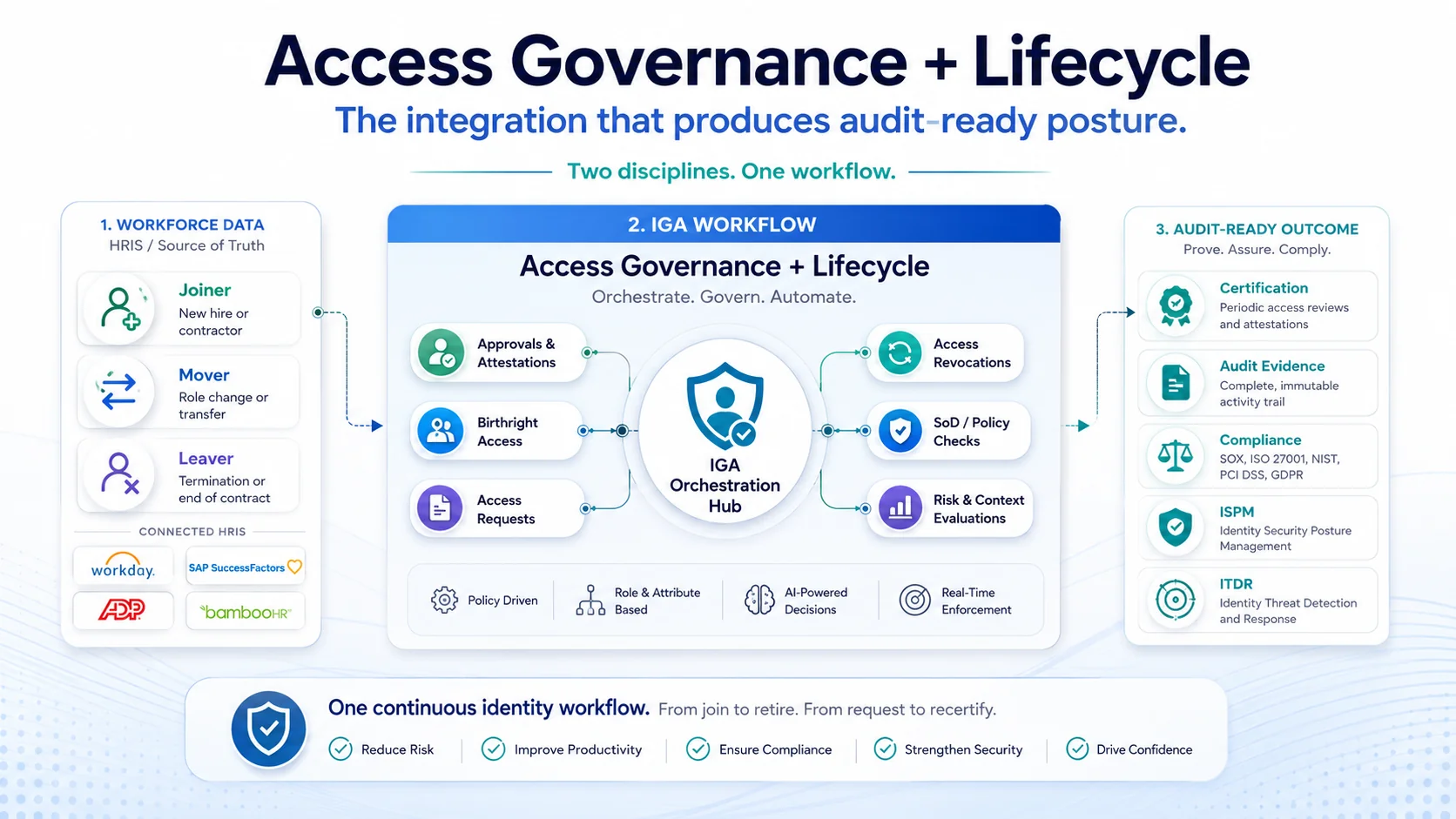
The 2026 enterprise reference on self-service password reset — SSPR architecture, five configuration elements, vendor comparison discipline, and audit compliance.
Read more
SCIM is the RESTful, JSON-based standard for automated identity provisioning and deprovisioning. What it is, how it works, and where it fits with IGA.
Read moreSelf-Service the Business Trusts, Governance IT Keeps
Automation can solve most IT tasks — but routine identity work still floods the help desk and slows the business. Avatier Group & User Self-Service moves that work to the people who own it, without giving up control. It turns IT from a ticket queue into a policy engine: business users and managers act for themselves inside the guardrails you set, while every request is approved, least-privileged, and logged.
This is how you cut overhead and raise security at the same time.